Back to Maintenance Manager for Education Main Menu
Activating and Deactivating a Work order Category
Both Admin and Technician can set up a work order category to align with school’s facility management requirements.
To Enable and Disable the Work Order category
-
Navigate to the
 > Manage Workorders.
 -
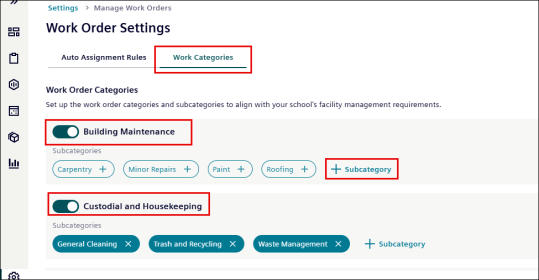
Click the Work Categories tab.
-
Use the toggle switch next to a category (for example, Building Maintenance) to:
-
Turn ON → Activate the Work Order category
-
Turn OFF → Deactivate the Work Order category
NOTE
• You can’t create new Work Order categories.
• You can’t disable the Miscellaneous Work order category.
• See Creating and Deleting a Work order Subcategory to add and delete a subcategory.
